1. Stagger Exam Start Times
To reduce simultaneous peak load on the server:
• Avoid starting multiple exams exactly at the top of the hour (e.g., 9:00, 10:00).
• Instead, distribute start times (e.g., 9:00, 9:10, 9:20, etc.).
2. Minimize the Number of Quiz Pages
- Avoid creating quizzes with many separate pages.
- Group multiple questions on one page.
- Each quiz page should require at least 5 minutes for students to complete.
Example: A minimum of 5 questions per page is recommended.

This helps reduce page reloads and improves overall exam stability.
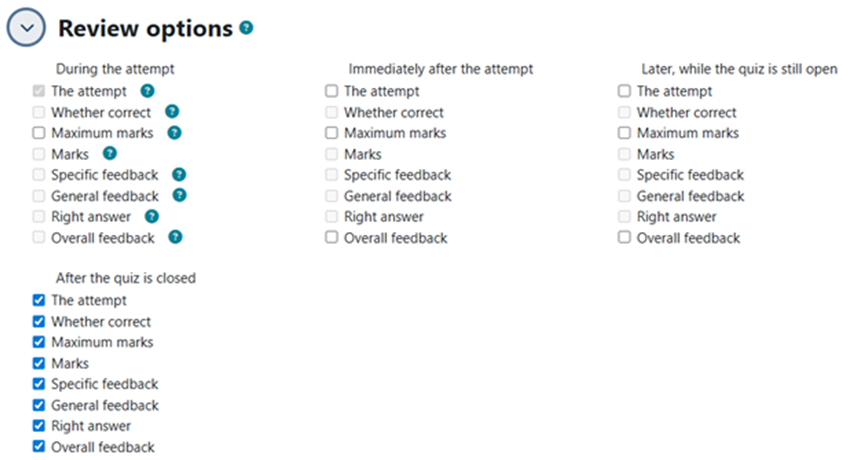
3. Limit Review Options During the Exam
To reduce database activity during peak load, please disable all review options while the attempt is open, including:
- Specific feedback
- Right answer
- General feedback
- Overall feedback
- Attempt summary during the attempt
These options can be safely enabled after the exam has fully closed.
4. Avoid Large Embedded Files
- Do not embed large images, videos, or audio directly inside quiz questions.
- If needed, upload large media files elsewhere in the course and link to them.
5. Choose Question Types Carefully
Some question types generate heavier server load, especially in large cohorts:
-
Heavy types:
- Drag-and-drop
- Matching questions with many items
- Essay questions (due to autosave frequency)
-
Recommended types:
- Multiple Choice (MCQ)
- True/False
- Short Answer
- Numerical questions