

Change Password for Faculty & Staff
- 20 Jan 2025
- 1 Minute to read
- Contributors

- Print
- DarkLight
- PDF
Change Password for Faculty & Staff
- Updated on 20 Jan 2025
- 1 Minute to read
- Contributors
- Print
- DarkLight
- PDF
Article summary
Did you find this summary helpful?
Thank you for your feedback!
Changing passwsord via Network
To change your AU account password using devices connected to the network, follow the steps below:
Note: this method can be used on-campus only and while connected to a network cable.
- Press CTRL + ALT + DELETE
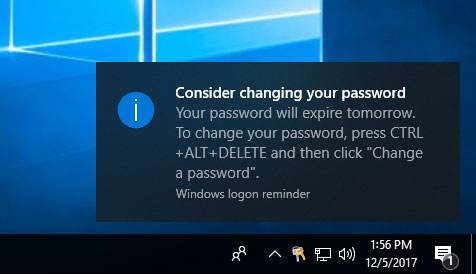
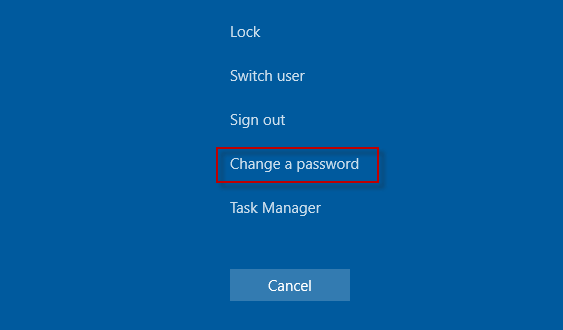
- Select Change a password.
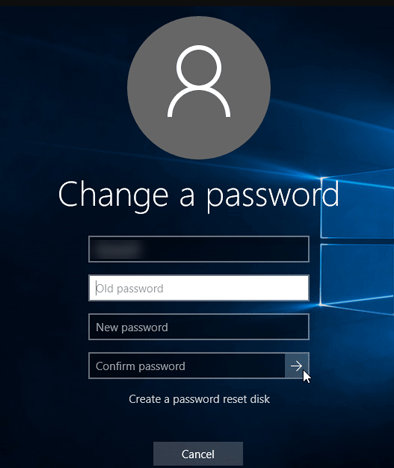
- Type your old password and the new password. Then click the arrow in the Confirm password box to change your old password to the new one.
Changing passwsord via Web
Alternatively, you can update your password directly via your AU email on the web by following these steps:
Note: this method can be used on and off campus.
- Go to www.outlook.com/ajman.ac.ae
- Click on your profile icon, then click on View Profile.
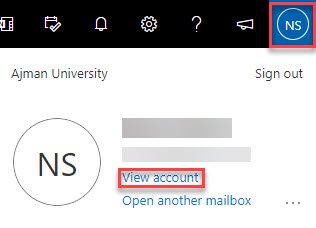
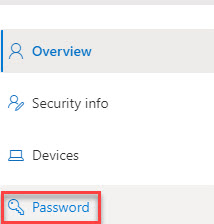
- Click on Password.
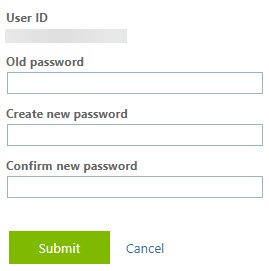
- Enter the old password, and new password, confirm it, and click on Submit.
 Password Policy:To learn more about the password policy, please refer to this article.
Was this article helpful?
